
“launched enterprise digital wallet with a 93% success rate and 10% above average checkout, earning 260K+ within 30 days”
Business Goal
Create a common payment experience that spans the enterprise. Keep consistency across the organization by creating a baseline widget.
Background
The enterprise has many platforms, all with different payment checkout experiences. By reusing technology consumers are familiar with, the enterprise will save on implementation costs and increase delivery time. The technology used is Stripes payment functionality, and as a start, influences the design of payment methods across an enterprise.
Using Stripes foundation, along with Accessibility became challenging when working with cross-organization teams who design and develop their own applications. Mobile first was our focus, which also introduced roadblocks.
Role
Lead designer: UX/UI focused on payment mental modals and research methods, including brainstorming techniques, initial designs and task workflows.
Project required working closely with:
- Capability Director
- Product Owner
- Stakeholders
- Front End/Backend Developers
- Enterprise Business Areas/Stakeholders
- Stripe: Product/Developers
- Solution: Product/Designers
- Optum RX: Product/Designers/Developers
- United Health Care: Product/Designers/Developers
Design Insight
Who are we designing a widget for? A consumer, who could be a patient, member, or customer service agent, needs a systematic way to add a payment method to accounts, which could span several applications. Familiarity and trust are vital when designing an experience with many sub-brands under one enterprise brand.

The widget is a contained component, (Influenced first by Stripes baseline capabilities) encompassing several elements of adding a payment method.
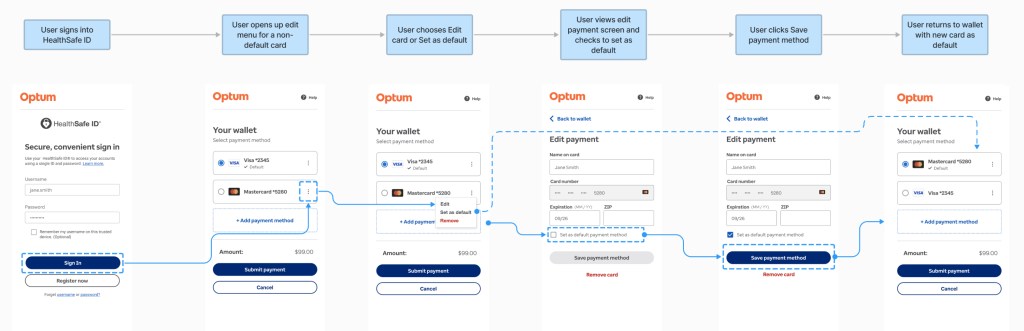
The component as a whole acts as a digital wallet and allows users to edit, add a payment, save, delete, make default. It’s responsive and is configurable to meet merchant sites across the enterprise.
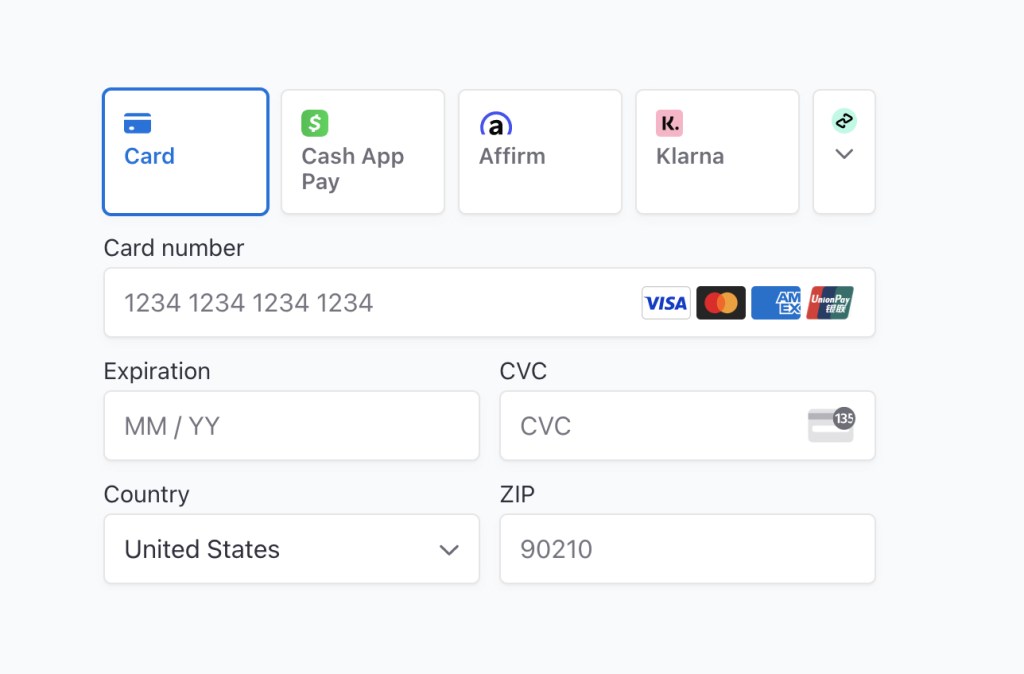
Competitive Analysis
A competitive analysis was done with several sites who use health related payment methods such as HSA, FSA, and medicare cards. Some of these competitors where Amazon, Walmart, and Target.
We also looked at financial apps and how they approach digital wallets, as health accounts are also considered payment methods.

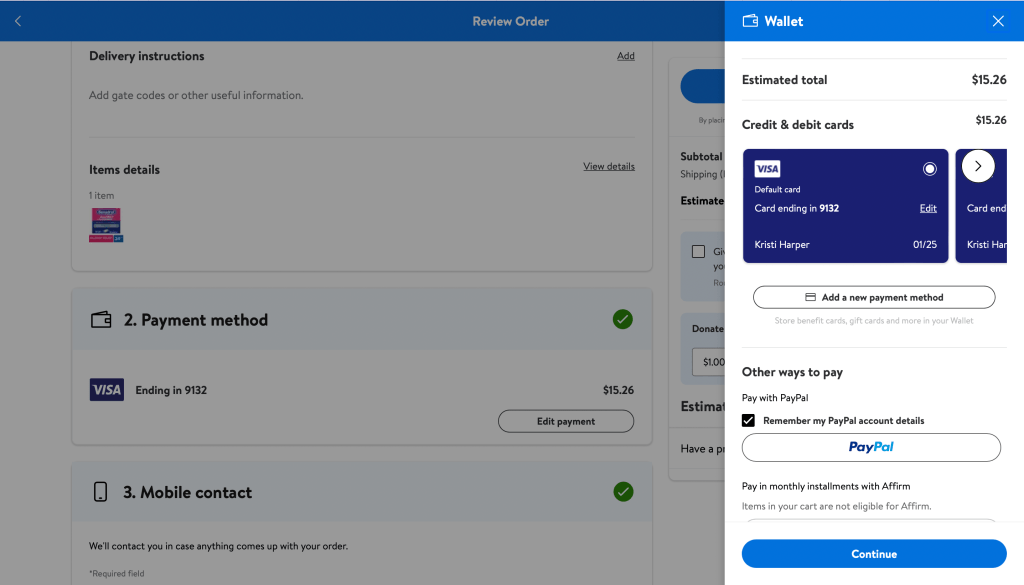
A Health Savings Account (HSA) card uses the same frontend UI as a Credit card, but to many consumers, they are two separate entries. The back end can be one in the same or different, depending on how the merchant handles the functionality.
We did not let “health accounts” drive the design; we looked broader at financial apps such as Paypal, a huge influencer, especially in the mobile app space. Its design utilizes both vertical and horizontal scrolling (which we found out later causes issues with accessibility).
Mobile first design helped drive the mental model of using a single container for multiple purposes. Oddly enough, both Stripe and PayPal have similarities as they both use common patterns in popular financial apps. All competitors we reviewed had familiarity with a digital wallet and its capabilities.
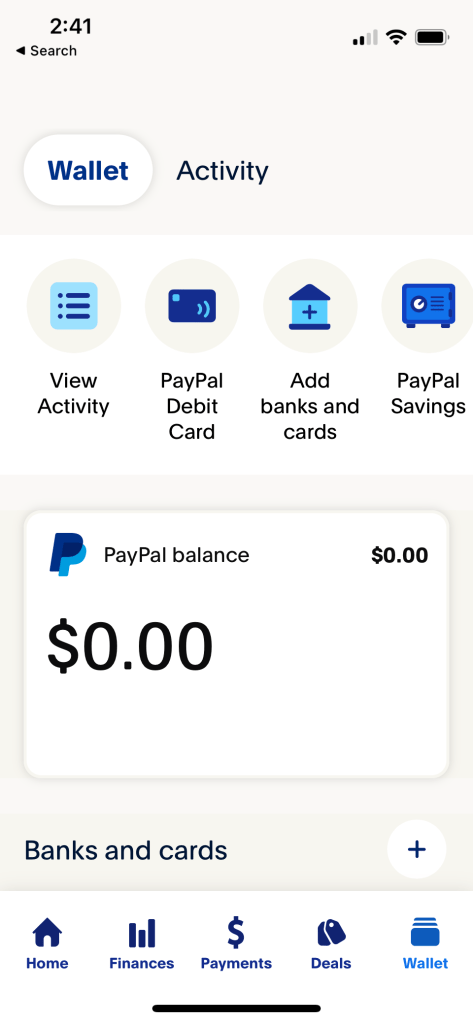
PayPal digital wallet UI for mobile app.

PayPal “Add to Wallet” UI for mobile app.
Design Challenge
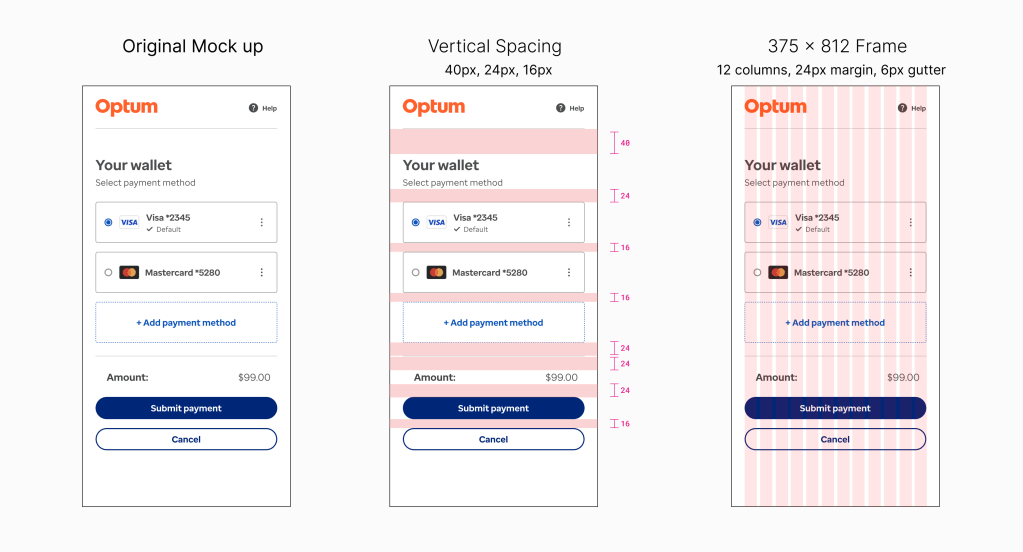
The widget works as a standalone unit. The container is one- column intentionally, thinking mobile first. The widget can embed in a business application, and may only have a small space to live with many supporting components. How does a single container that is enterprise wide work in many different areas?
Design Solution
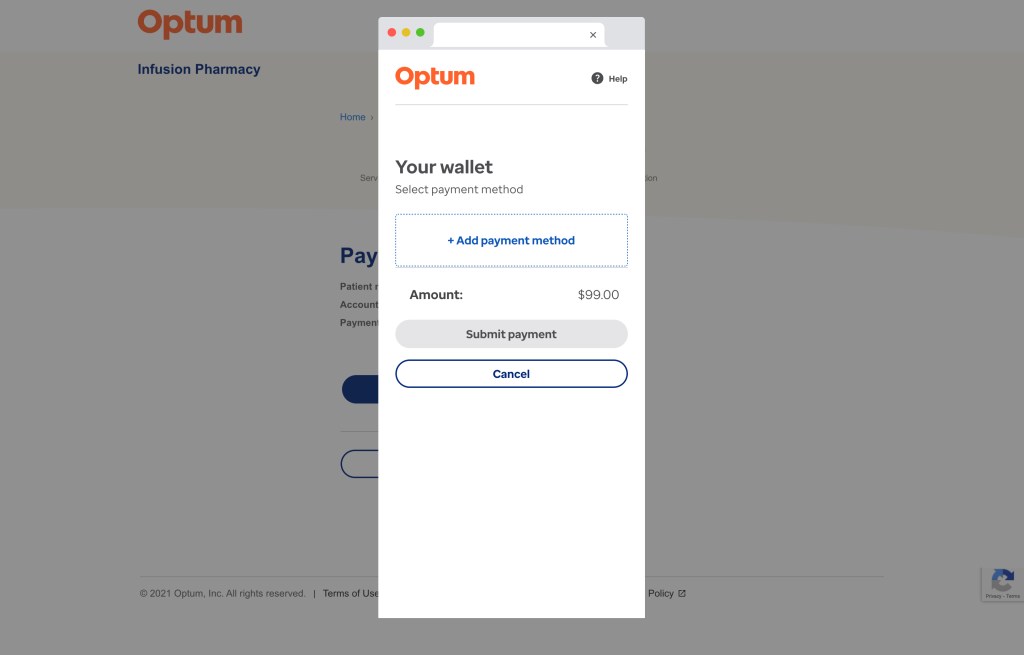
The solution to making one size fits is having the one-column container responsive. It can work in a mobile app and a responsive website as an embedded component or pop-up. A hosted experience allows the container to present itself in an overlayed browser window.
The varied usage of the container gives the merchant sites flexibility while using the same capabilities. Parts of the widget and the screens can be customizable with text, color, and styling.


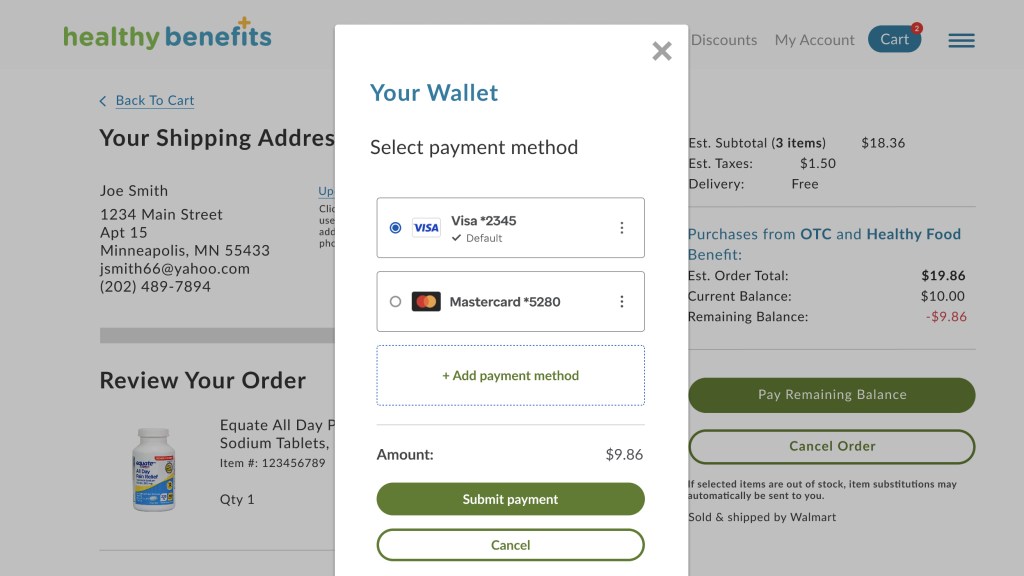
Solutran’s payment widget integration.
User Flows
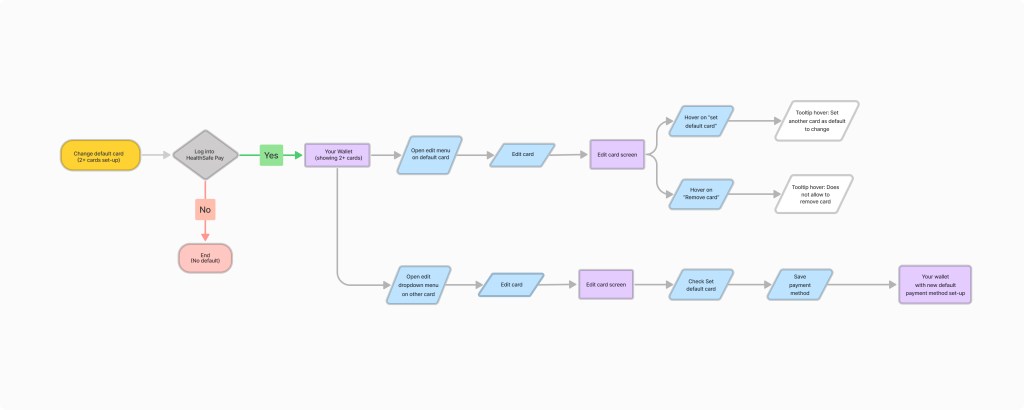
There were discussions focused on integrating the payment method editing feature into other business interfaces, which sparked controversy.
The current one-column design, which includes all tasks, caused issues for applications with a separate flow for editing the payment method. These issues also raised concerns about accessibility.
Accessibility Standards
The desktop has clear and defined standards for accessibility, but mobile apps are not as strict and have fewer standards.
After consideration of specific use cases, testing, and accessibility evaluation, the widget undergoes continuous change as it evolves and adapts to various enterprise use cases and accessibility evaluations.

Mobile apps influenced the design because it’s a single-column, and many user tasks are contained within the container; therefore, accessibility arose when addressing solutions for desktop and mobile.
Issues arose when we embedded one-column widget within applications. As a standalone, accessibility is one thing; when embedded in an interface with other components, it adds complexity.
Accessibility Challenge
Issue found was the vertical menu used to edit the payment types. The vertical menu pattern is found on many popular apps, but accessibility is not defined as well on mobile as it is on desktop.
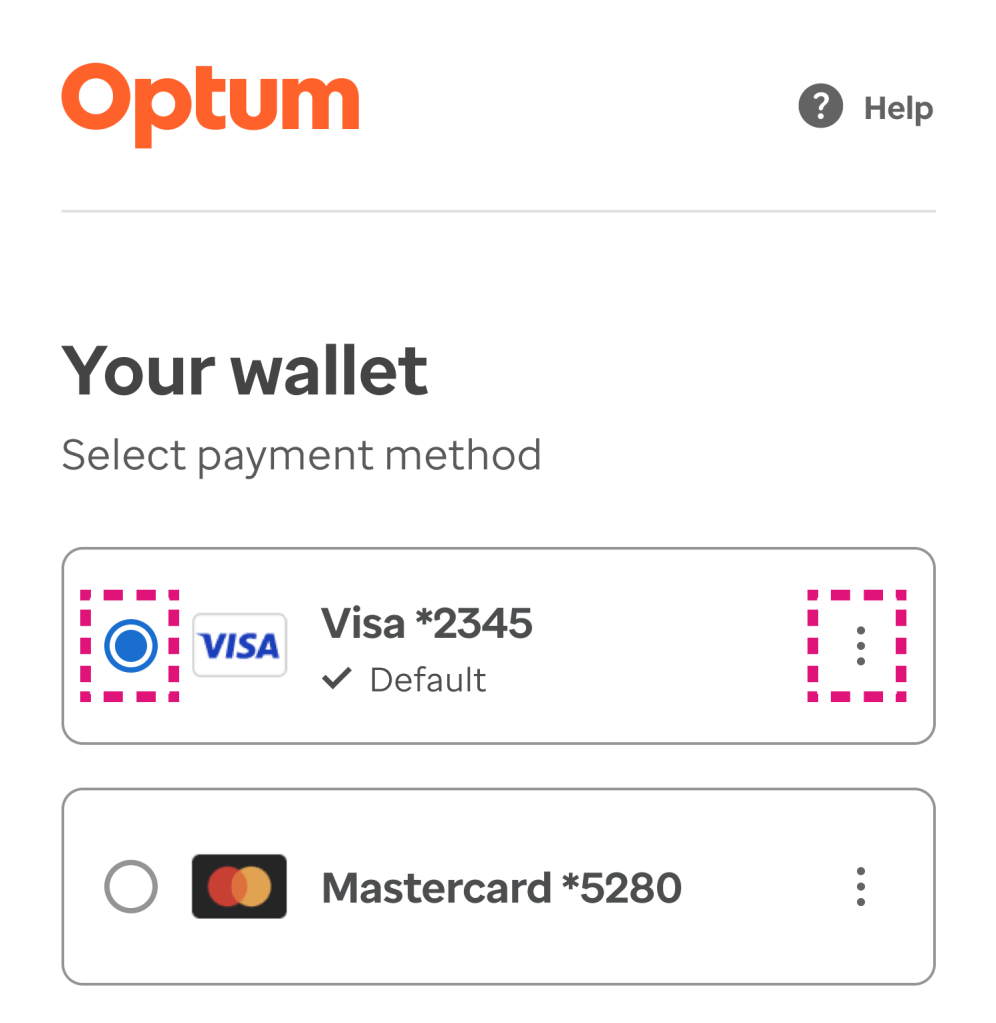
The keyboard tabbing order was not clear when tested for accessibility. The radio button (used for selection) and the vertical menu (used to edit) are utilizing the same focus area. Because the standards for accessibility are higher than usual for health applications, we had to find another solution.
Accessibility Solution
For the next design iteration (phase), the kabab was removed, not only for accessibility but also for scalability of the widget. In order to pass the focus state for keyboard tabbing, we made the “Edit Payments” a separate page, which also includes the “Add Payment” button.
Creating an “Edit” flow another page removes accessibility complications: multiple items competing for tab focus; this approach also simplifies the digital wallet screen from a visual hierarchy perspective.

Takeaways
When designing for a common capability across multiple applications, one thing is to remember responsive desktop and mobile app designs are different for a reason. Certain functionality is not present, depending on the device. Example: keyboard tabbing is not used on mobile devices but is on a desktop.
Accessibility standards are different for both platforms and are treated as such. Sometimes one size fits all has to be configurable to make it work, especially with enterprise business applications using different technology stacks.
 Kristi Harper