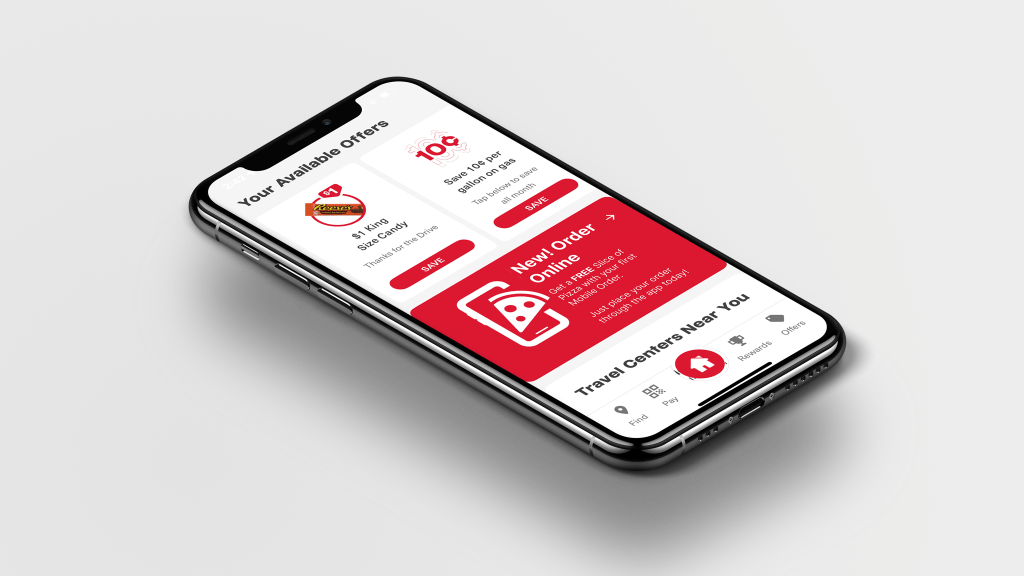
Tag: onboarding

  • Order Ahead With Mobile Ordering

    “launched mobile ordering with welcome offer generating 2.2K+ mobile transactions within 2 weeks of go-live”

    Business Goal

    Transform Pilot from being primarily known as a fuel stop into a reliable, convenient food destination by launching Mobile Ordering & Order Ahead directly in the Pilot app. The initiative aimed to:

    • Establish brand awareness on the platform, engaging customers while establishing first-time transactions and becoming loyalty members.Grow food & beverage sales through first-party digital channels
    • Improve convenience and order accuracy for guests on the road
    • Reduce dependency on third-party delivery commissions while still leveraging marketplace reach
    • Create repeatable, scalable store workflows for consistent guest experience across locations

    Background

    Pilot’s early digital success came through third-party delivery platforms (DoorDash, Uber Eats, Grubhub). These partnerships helped build foundational practices around:

    • Menu & modifier structuring
    • Bagging and labeling workflows
    • Basic staging / pick-up coordination

    However, first-party Mobile Ordering introduced new requirements:. Guests, not delivery drivers, would be picking up orders.

    This shift required:

    • Creating brand awareness in-store that coincides with app experience
    • Clear pickup signage and location flow
    • Standardized bagging and condiment workflows
    • Defined refund and exception handling
    • Training & adoption support for store teams

    Additionally, menu expansion beyond pizza into hot deli, grab-and-go, wings/tenders, and cold case offerings increased order complexity — making operational consistency essential.

    Role

    Business Stakeholder & Digital Product Management, I connected Product + UX Design + Store Operations + Support + Consumer Insights to ensure the mobile ordering consumer experience worked both digitally and operationally.

    My goal: create a seamless and reliable end-to-end experience, from the digital interface to the final pickup.

    Core responsibilities:

    • Engage and retain customers
    • Authored the business case and rollout strategy
    • Translated store workflows into product requirements
    • Established bagging, condiment, labeling & staging standards
    • Built cross-team alignment frameworks for execution consistency
    • Created and maintained the Guest Feedback, insight, and fix loop

    Project required working closely with:

    • Marketing
    • Product & UX Design
    • Product & Engineering
    • Operations Excellence & Field Teams
    • Food & Beverage Leadership
    • Customer Support
    • Consumer Insights
    • Guest Services

    Business Insight

    We were already running third-party delivery through DoorDash, Uber Eats, and Grubhub — which gave us mental models to work with.

    Delivery surfaced operational patterns:

    • Missing condiments which caused instant guest frustration
    • Bagging process was not effecient which slows pickup
    • If pickup isn’t signed clearly guests feel lost
    • Refund handling must be consistent to maintain trust
    • Drive website and app traffic, build brand awareness

    Instead of starting from scratch, we built Mobile Ordering on top of what worked — and improved what didn’t.

    Mobile Ordering wasn’t meant to replace delivery — it complemented it:

    • Delivery drives reach.
    • Mobile Ordering drives loyalty, margin, and repeat behavior.

    Customer Experience

    Established a welcome offer experience that converts intent into action by rewarding users at the exact moment of sign-up.

    Problem’

    Traffic does not convert users not loyal members. Guests lacked an immediate, tangible reason to create an account. Adoption of the app was also a concern as guests are introduced to new behaviors.

    Strategy

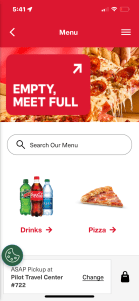
    New users are promoted to download the app and join the loyalty program to unlock a free slice of pizza, the offer saves to their account once the account is created, and is redeemable before checkout.

    Customer Engagement

    Bring a clear value proposition t entry points, making sure several entry points are accessible. This allows them to Join the program, save the offer, and redeem at checkout.

    • Reward immediately when added to checkout to reduce friction
    • Redemption at checkout reinforces behavior and perceived value.
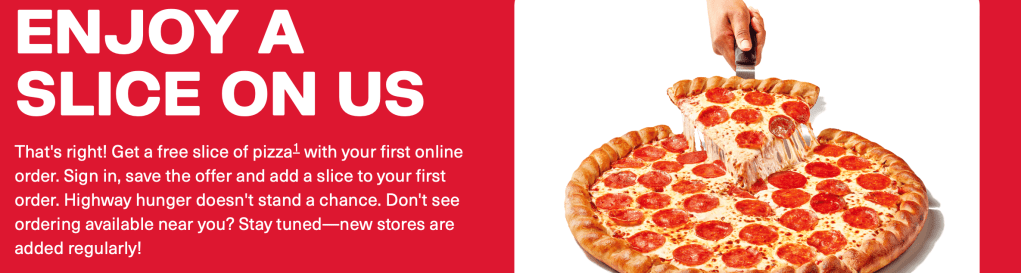
    Welcome Offer
    Welcome offer presented in store as well as on the app.

    Outcome

    The flow transformed loyalty from passive concept into active, non- loyalty members into reward members, with a value driven experience. Converting anonymous traffic into registered users, increasing first-order transactions, establishing early habits that support long-term retention.

    Third-Party vs Mobile Operations

    Each platform has its own personality—different user habits, interfaces, and technology. We had to recognize those nuances and adjust our approach so the experience felt seamless no matter where guests ordered.

    FactorThird-Party DeliveryPilot Mobile OrderingOperational Impact
    PickupDrivers pick upGuests pick upRequires signage and clear handoff points
    Business ValueReach & new customer acquisitionLoyalty, repeat behavior, margin retentionInternal channel holds highest lifetime value
    Data OwnershipMarketplace owns guest dataWe own behavioral and order dataEnables personalization and offer strategy
    Operational FocusBag for driverBag for guest presentation and clarityRequires standardized pick and packing workflow

    Market & CX Research

    We looked at how other brands handle customization, pickup, and fulfillment. We grounded decisions utilizing mental models from our competitors:

    BrandLearningApplied Change at Pilot
    CAVAIngredient customization is easier when modifiers are groupedGrouped toppings and sauces in menu UI
    Starbucks PickupBag labeling + staging must be visible from entry pathStandardized label placement + pickup shelf visibility
    First Watch To-GoCondiments pre-bundled reduce accuracy issuesBuilt condiment kits prepped at shift start
    Love’s Travel StopsLack of directional signage creates confusionDesigned pickup signage templates and location placement guidance

    We also performed observational store walk-throughs, time studies, and Food Business Partners ride-alongs to understand:

    • Prep rhythm
    • Team communication during peak hours
    • Space constraints by store layout
    • The “mental load” of bagging vs. serving walk-in guests

    Insight: The product can only succeed if the workflow is fast, clear, and repeatable under pressure. Guests want food ordering to feel effortless and predictable.

    Operational Enhancements

    Created fulfillment standards to reduce complexitity and elevate the guest experience. The enhancement had business and guest impact. These standards create ease of operation for the team members and elevated experiences for the guest.

    Condiment Standards

    Guests care about condiments more than we think. Missing condiments = instant frustration.

    Solution

    • Created a condiment pairing matrix for every menu item
    • Introduced pre-built condiment kits for simpler pack-out
    • Added visual prompts at the assembly station

    This alone reduced refund requests tied to “missing item.”

    Example of condiment offerings:

    • Packets: Ketchup, Mustard, Mayo
    • Dips: Ranch, BBQ, Honey Mustard, Blue Cheese

    Example of condiment by category:

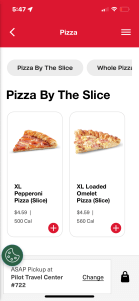
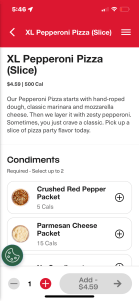
    • Whole and Sliced Pizza: Crushed red pepper, Parmesan cheese
    • Chicken: All packets and dips
    1. Guest selects product.
    2. Guest selects flavor.
    3. Guest selects condiments.

    Bagging & Label-First Workflow

    Before mobile ordering, every store bagged differently — which meant guests sometimes couldn’t tell which order was theirs.

    Solution

    • Standardized bag size
    • Implemented a label-first workflow
    • Created visual pack-out diagrams (especially for hot + cold orders together)

    This improved speed, consistency, and guest confidence at pickup.
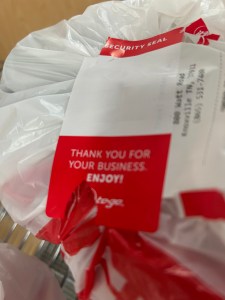
    Test: Tamper/label sticker on plastic bag.
    Test: Tamper/label sticker and receipt on handles of paper bag.
    Test: Tamper/label secure closure on bag.

    Pickup Zone Signage

    Pickup only works when you know where to go.
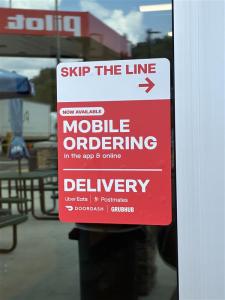
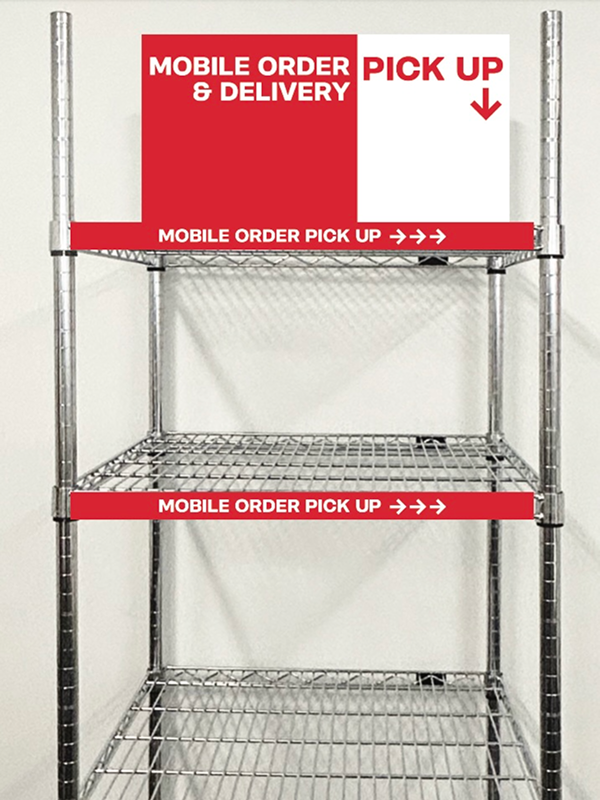
    We designed clear signage and recommended placement by store layout, so guests never have to ask.

    This reduced counter congestion and supported staff during peak hours.

    Cling Door Sign
    Cling artwork.
    Door cling on entry door.
    Rack
    Signage on rack.
    AreaChange ImplementedResult
    CondimentsCreated condiment pairing standards and ready-to-grab kitsReduced missing item complaints & improved guest satisfaction
    Bagging WorkflowStandardized mobile ordering pick and packing proceduresFaster fulfillment and clearer pickup identification
    Pickup Staging & SignageRack and signage placement based on store formatReduced “Where do I go?” questions & counter congestion

    Refunds & Guest Feedback Loop

    Created a structured feedback loop with prioritization and a follow up system to field ops team and product teams for improvement.

    • Inputs: Support tickets, app feedback, field manager reports, refund data
    • Analysis: Identify patterns (e.g., condiments missing at open, pickup signage creates low visibility)
    • Action: Deliver workflow and UX + communication updates
    • Validation: Field test → rollout → reassess

    This allowed Mobile Ordering to improve after launch, and not become stagnate.

    Solution

    • A repeatable system to convert guest and field feedback into product and operational improvements.

    Inputs Used

    • Guest support tickets
    • App and store signage usability feedback
    • Food Business Partners surveys
    • Menu performance and refund analytics trends

    Outputs Produced

    • Menu configuration simplifications
    • Condiment pair defaults added to packs
    • Pickup signage moved to higher visibility zones
    • UX naming and layout improvements

    Outcome

    • Continuous improvement driven by real behavior, not assumptions.

    Business & Guest Impact

    With operational enhancements, a refund process in place and a feedback loop implemented.

    • Condiment Standards: Fewer remake requests, improved completeness
    • Bagging Workflow: Faster fulfillment and easier guest identification
    • Pickup Staging & Signage: Reduced confusion and counter congestion
    • Refund & Support Flow: Faster resolution and higher trust

    Workflows became consistent across stores which lowered stress for travelers & pro drivers. Reduced refund and remake costs which increased confidence the order will be right. Strengthened brand perception as a food destination which encouraged repeat ordering behavior.

    Takeaways

    Even though the deadline was tight, we followed a mental model based on other popular apps‘ patterns.

    Digital success only happens when store workflows support the promise. Third-party delivery was our operational test bed — we matured from there. Small details (condiments, labeling, signage) drive large experience outcomes.

    With business and operational knowledge, I was to integrate business goals and UX design with real-world execution.

    Learned from Third-Party DeliveryHow it Applied to Pilot Mobile Ordering
    Drivers need fast, clear pickup zonesGuests need clear pickup zone signage & staging areas
    Delivery errors often stem from missing condimentsCreated condiment pairing Standards + pre-built condiment kits
    Bagging inconsistencies slow handoffImplemented label-first bagging workflow to increase speed & identity clarity
    Refund friction reduces trust & costs moneyBuilt refund & recovery playbook with scenario-based paths
  • In-App Concessions Sales

    “launched contactless ordering in 190 select theaters for social distancing efforts, generating 22K+ mobile transactions on go-live weekend”

    Business Goal

    Create a new feature to encourage moviegoers to order food and snacks within the app to reduce wait times at the concessions stands.

    The business goal was to implement contactless ordering, increase speed of service, and add convenience. The development team needed time to build and release before reopening theaters at the end of the summer.

    Background

    There is an MVP version, as well as a post MPV version. The feature is to be implemented on Cineworld’s mobile app and other tenants around the globe.

    Contactless ordering helps with social distancing and safety measures but will also encourage app downloads and in-app revenue.

    Role

    Lead designer: UX/UI focus in various design and research methods, including brainstorming and problem solving techniques, competitive analysis, and iterative workflows within a testing environment.

    Project required working closely with:

    • Business Analyst
    • Product Owner
    • Marketing
    • API Developers
    • Front-End Developers
    • Food and Beverage
    • Operations

    Design

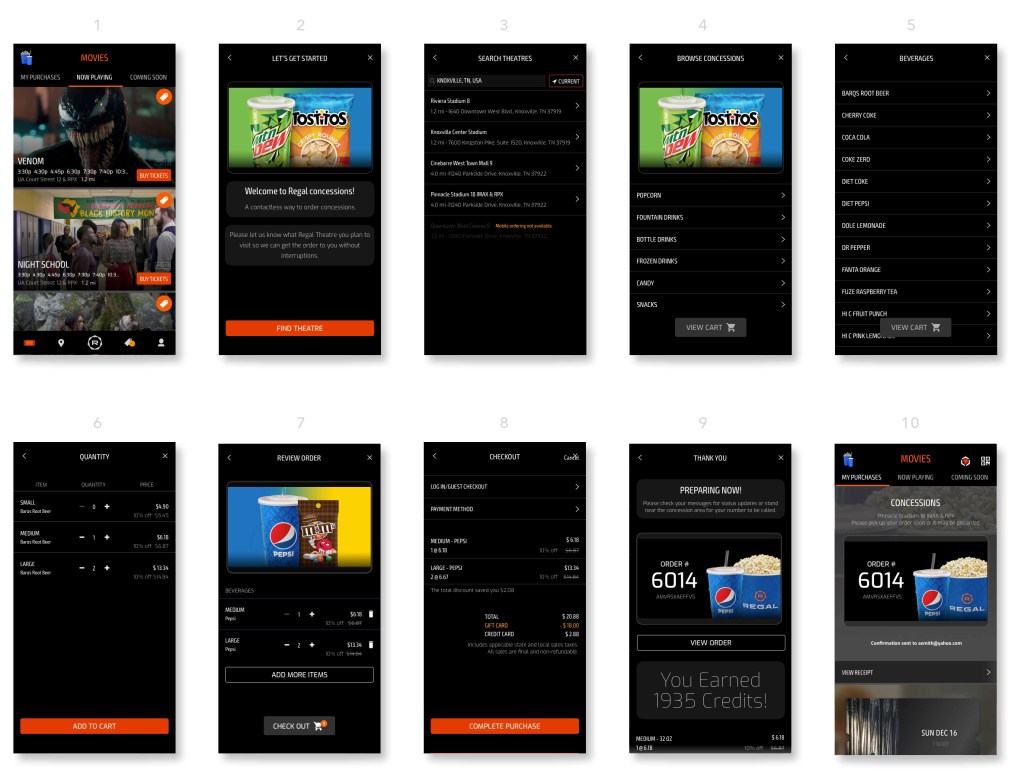
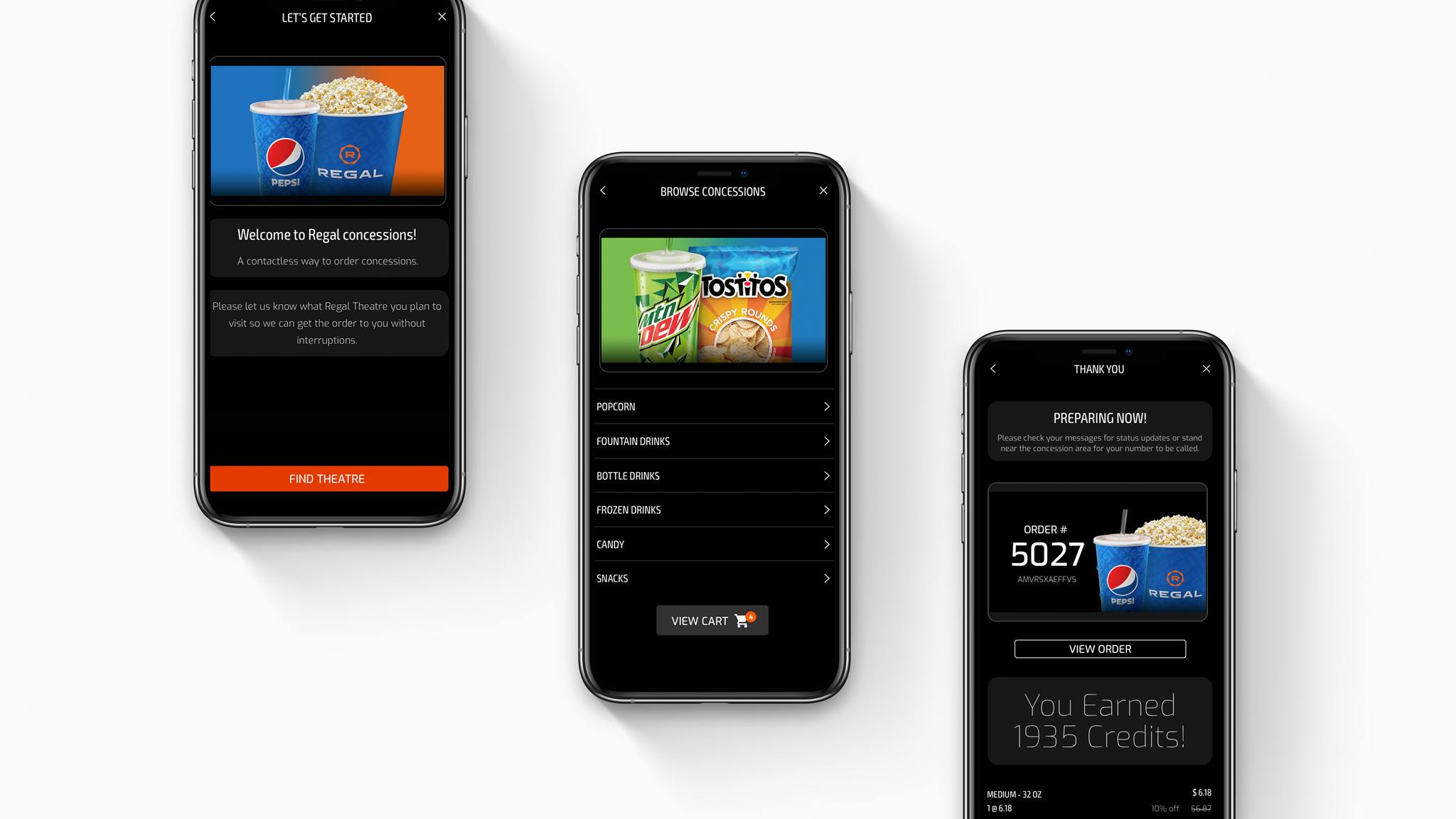
    Create a workflow in the app for contactless ordering of concessions.

    • Make a multi-step workflow intuitive
    • Avoid dropouts during signup

    Design Insight

    Within a week, the competitive analysis and a early concept influenced stakeholder buy-in.

    We could gauge stakeholder’s reaction to the design before creating a lo-fi prototype.

    The quick prototype allowed the business to view something tangible. A workflow to review for early feedback, and an opportunity to refine the ask.

    Onboarding

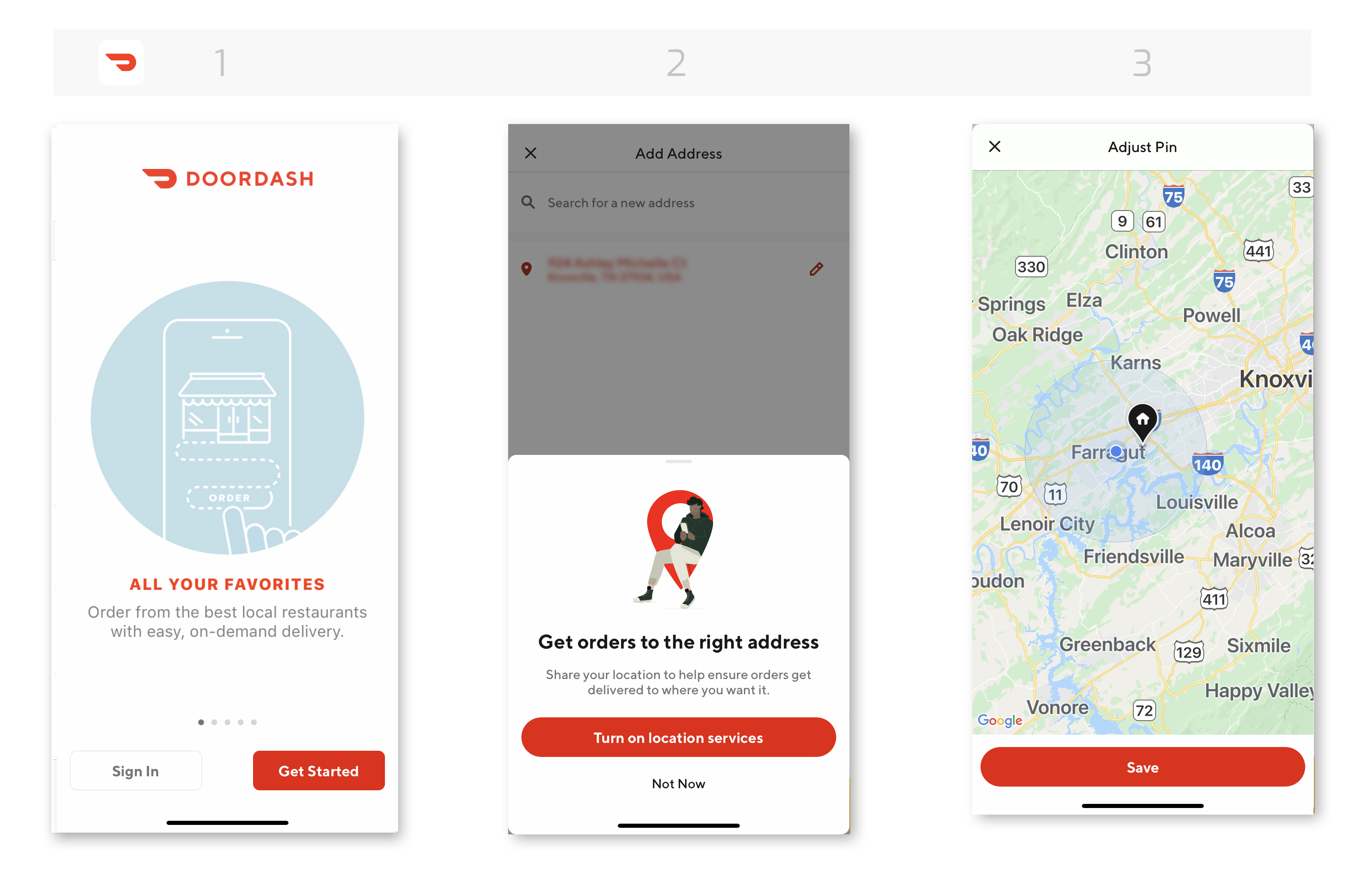
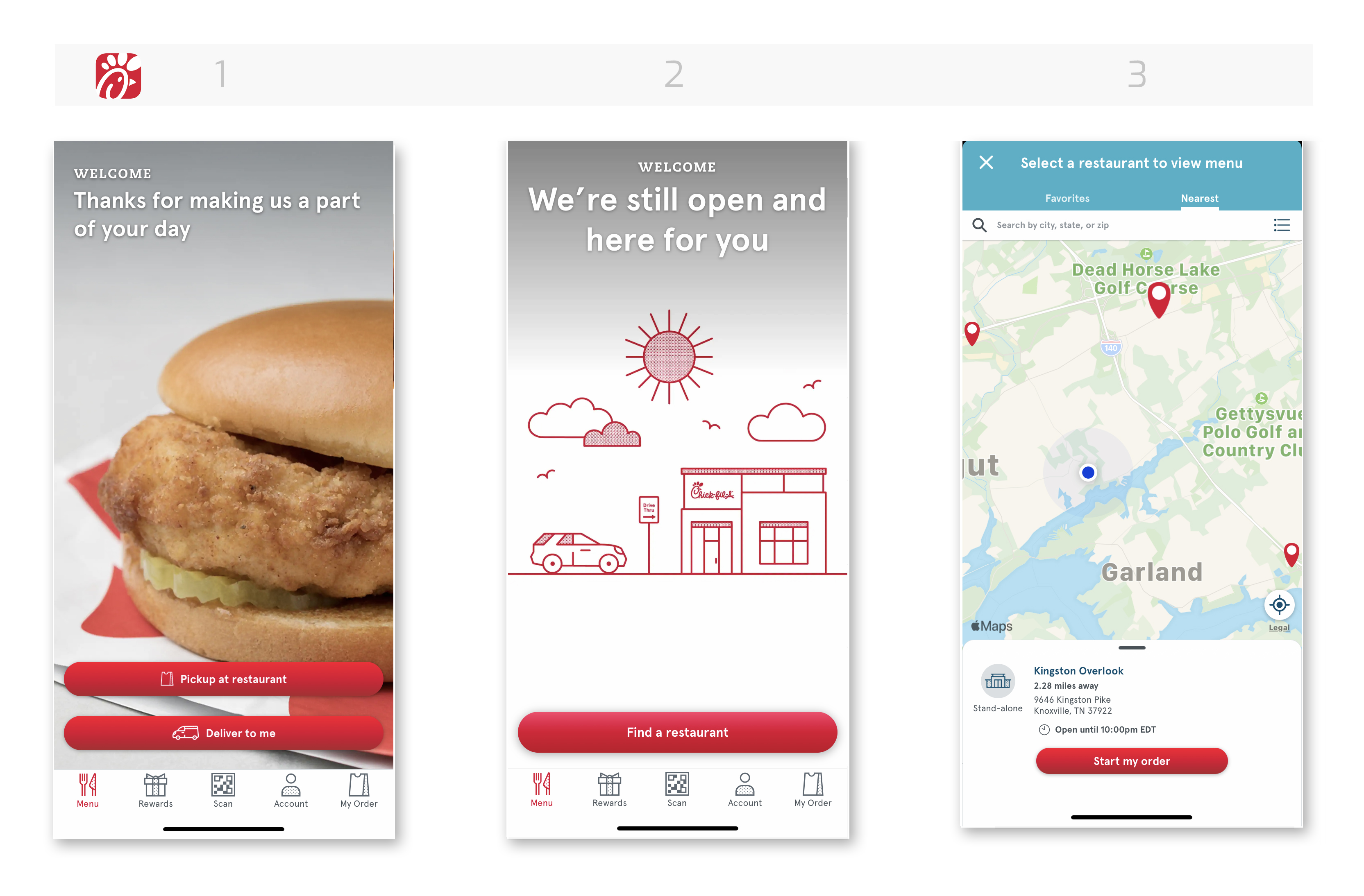
    DoorDash and Chick-fil-a are two apps that stood out when it came to onboarding in-app food ordering.

    Not everything about DoorDash aligned with our goals, but the onboarding part did match.

    The three screens below show:

    • Intro screen
    • Location services
    • Manage location
    Competitive Analysis: DoorDash On-boarding
    Competitive Analysis: DoorDash On-boarding

    Click-fil-a also has similar screens as DoorDash, but the intro screens differ slightly, being that Chick-fil-a is task-driven and DoorDash is informative.

    Both apps helped grasp the behavior and order of how the screen interact with one another and flow.

    The onboarding section is the first screens users interact with when entering the workflow. It sets the tone for the rest of the experience.

    Competitive Analysis: Onboarding - Chick-fil-a
    Competitive Analysis: Onboarding – Chick-fil-a

    Mental Models

    The menu levels and food tiers are essential because they define the hierarchy of the menu. Taxonomy is key.

    Due to resource constraints during the pandemic, the MVP menu did not include images for all menu items and concessions. Instead, the menu was prioritized based on popularity and inventory, with categories organized from broad to detailed for a streamlined user experience.

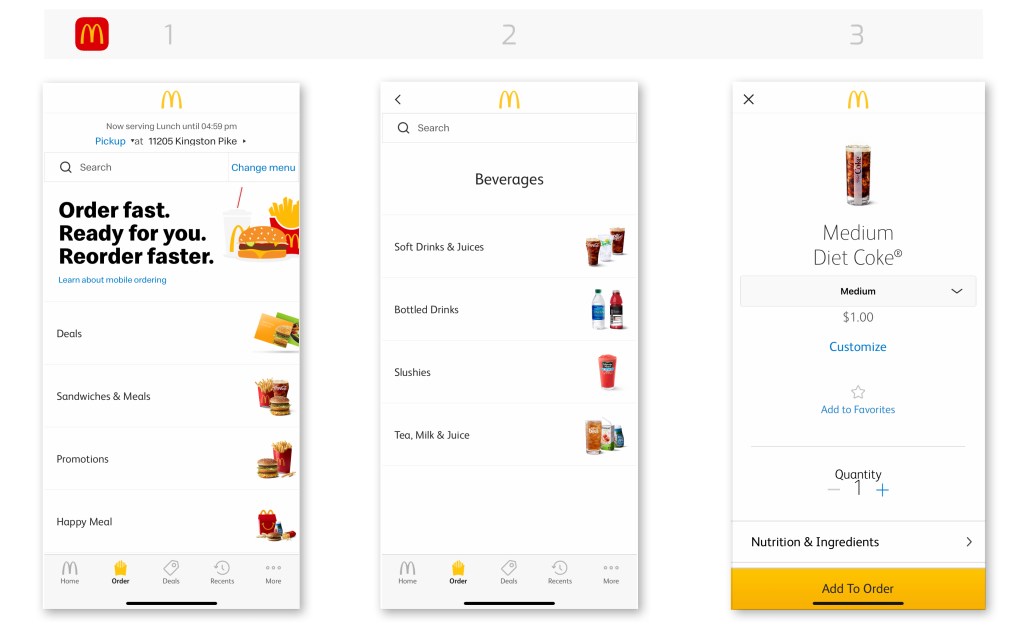
    McDonald’s and Chick-fil-a are two apps that stood out when it came to in-app food menus.

    Both apps aligned closely with the food menu structure for concessions. McDonald’s app has an easy to read the menu with defined categories.

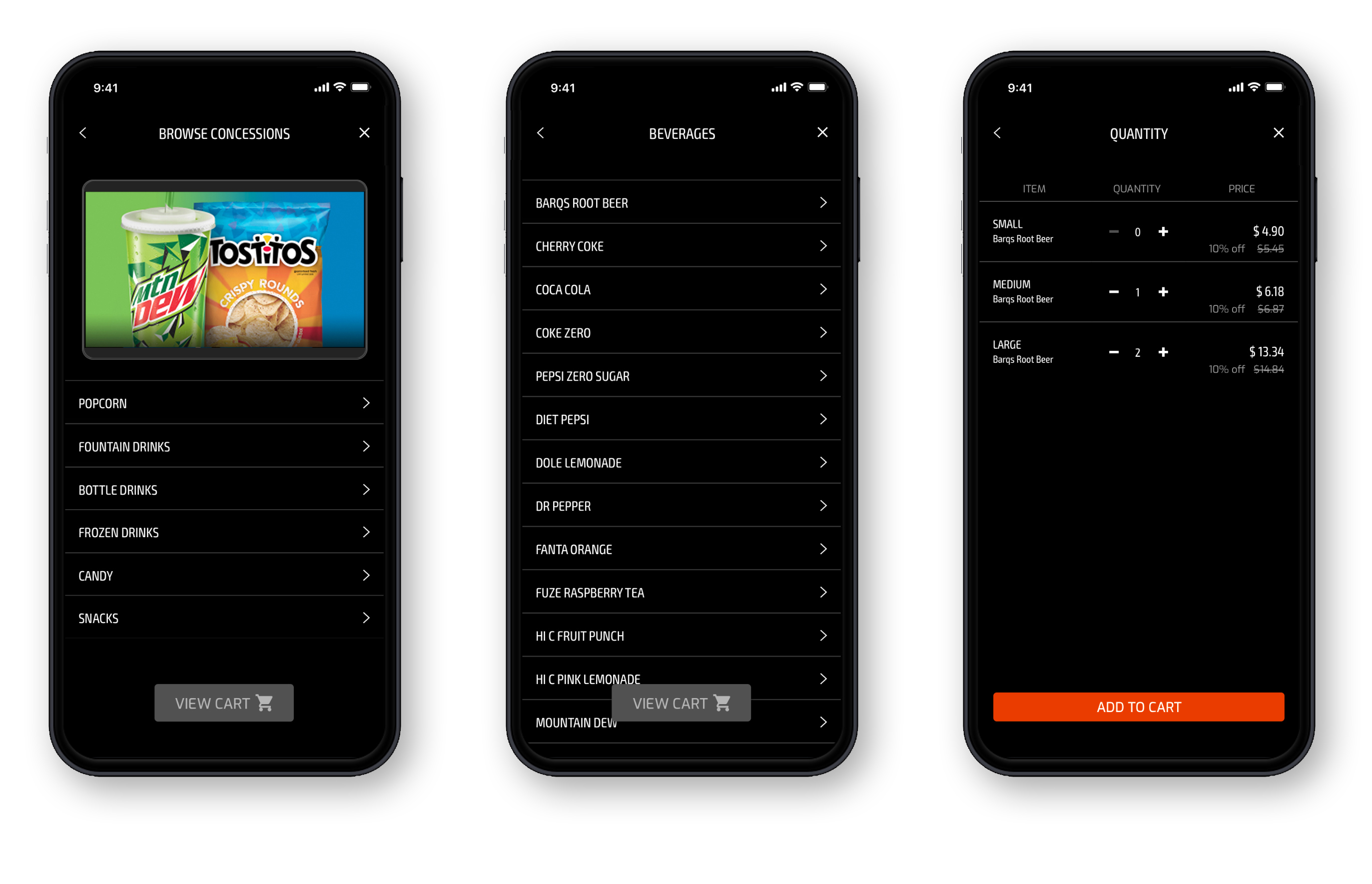
    The quantity screen helps visualize what information needs to be present for the user to complete their order.

    Competitive Analysis:Menu Hierarchy - McDonald's Food Menu
    Competitive Analysis:Menu Hierarchy – McDonald’s Food Menu

    Chick-fil-a has a similar structure to McDonald’s. Both have what concessions is requiring:

    • Food categories
    • Single food category
    • Single item in the food category and quantity

    Notice both have customization on the quantity screen? You can add extra ice or give special instructions.

    Chick-fil-a has calories on its quantity screen, whereas McDonald’s has a menu to the nutrition values.

    These concepts are nice to have, but not all can be for MVP as the deadline is tight.

    Competitive Analysis: Food Menu Hierarchy - Chick-fil-a
    Competitive Analysis: Food Menu Hierarchy – Chick-fil-a

    Intentional Design

    The McDonald and Chick-fil-a food menus above influenced the outcome of the design for concessions. With minimal setup and no item images, we focused on taxonomy and data pulled from the food and beverage list.

    Managed by F&B, Operations, and API developers, this was a large collaborative effort to have the categories and item names appear a certain way that is user friendly.

    There was a lot of troubleshooting on the backend and character limits on the titles, approvals, and functionality. Time was not on our side, and inventory was limited per theatre location.

    Menu Hierarchy: Food categories

    Workflows and Behaviors

    The competitive analysis helped with understanding how to create a workflow even if it’s a rough draft.

    The workflow helps with issues early on. Viewing the customer journey from a big picture helps identify:

    • Missing scenarios
    • Current state
    • Current state reworked
    • New screens
    • Conditional behaviors
    • Messaging
    • Error messages
    • Edge cases

    Knowing the current state and future state helps with repurposing existing screens.

    The workflow helps with implementation and development and consistency with components.

    Feasibility: Expectations and limitations
    Feasibility: Expectations and limitations

    User Scenarios

    Scenarios use the paradigm and mental modal McDonalds and Chick-fil-a have; using a familiar pattern, the user will adapt more quickly.

    Wireframe sequence.

    Takeaways

    Even though the deadline was tight, we followed a mental model based on other popular apps‘ patterns.

    Knowing your current state helps implement a tight turnaround because you can reuse components and screens already created.

  • Monthly Revenue With Subscriptions

    Regal Unlimited App

    “launched mobile in-app subscriptions, generating 80K+ sign-ups within 30 days, surpassing competitors”

    Business Goal

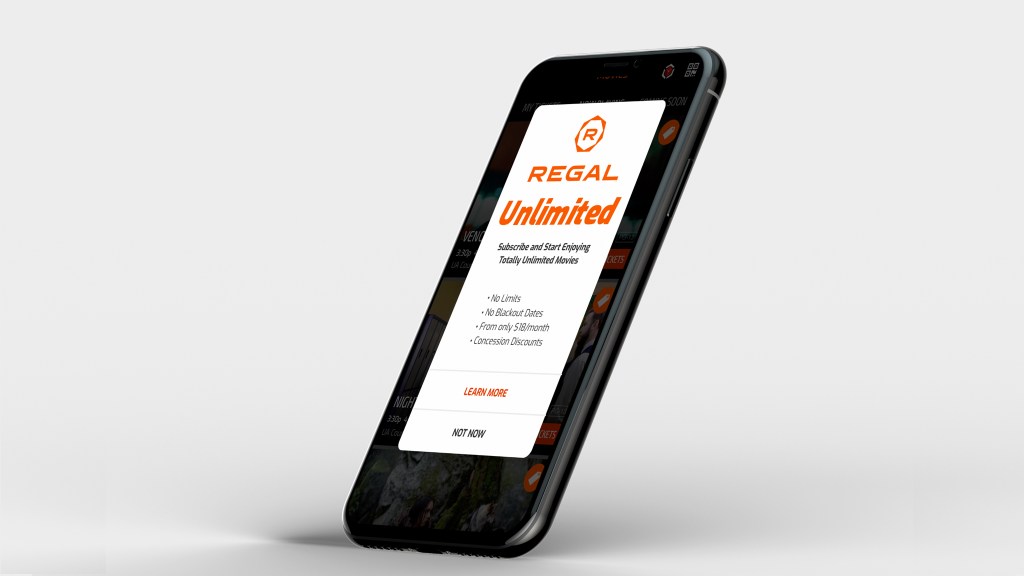
    Create a workflow in the mobile app for a movie subscription. Allow new and existing loyalty reward members to signup and then book tickets in a sequential order that is easy to use.

    Background

    The subscription based plan existed, but was only available for registration at the box office or over the phone with customer support

    Having the signup process integrated with booking tickets will increase ticket sales, loyalty memberships, movie subscriptions, and encourage app downloads.

    Role

    Lead designer: UX/UI focused on various design and research methods, including brainstorming techniques, feedback from surveys, user testing, iterative designs, and workflows.

    Project required working closely with:

    • Business Analyst
    • Product Owner
    • Marketing
    • Stakeholders
    • Developers (iOS and android teams)

    Design Insight

    The understanding of the current state of an application and its current behaviors and workflows is key before doing anything else. An audit of the app’s current workflows, as well as screen grabs of the current state in both mobile platforms, was documented for use of journey mapping.

    This activity helped the team understand what we currently have and what we have to work with. It may be that an ask in the MVP can not be completed because of the additional development work of technology not currently in the app.

    Android: current state
    Android: current state

    Journey Mapping

    Another exploration was to document the workflow for booking a ticket since this activity was a key performance indicator (KPI) for the business. It also helps understand any current pain points within the app. This journey includes booking a ticket and signing into their loyalty rewards account.

    Challenge: the new subscription flow will integrate into the scenario below, which includes signing for the rewards program, as well as an existing member login. The business rule is that a user needs to be a loyalty member before signing up for the subscription plan.

    Scenario: John opted in to his Regal app for the first time on his phone, he wants to find a movie and look tickets. John is not a RCC loyalty member, nor does he have a Regal account.

    Booking a ticket: User journey map
    Booking a ticket: User journey map

    Competitive Analysis

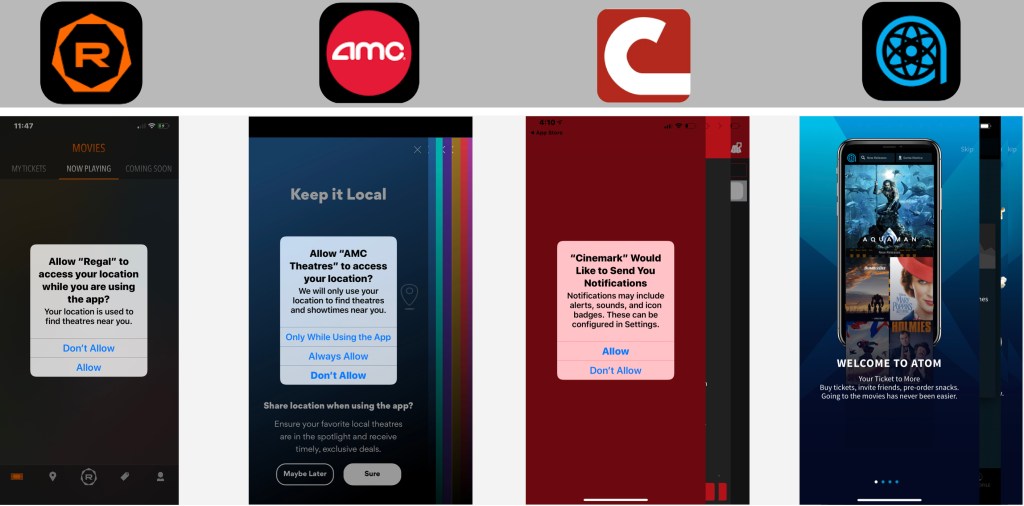
    AMC, Cinemark, and Atom are among the competitors for subscription services.

    Each competitor offered an on-boarding workflow with multiple screens.

    Our goal was to guide as needed throughout the workflow, eliminating several introductory screens all at once.

    Consider cognitive load; if guides present themselves when the task is at hand, it becomes useful to the user than at the beginning of the journey.

    Competitor on-boarding screens
    Competitor on-boarding screens
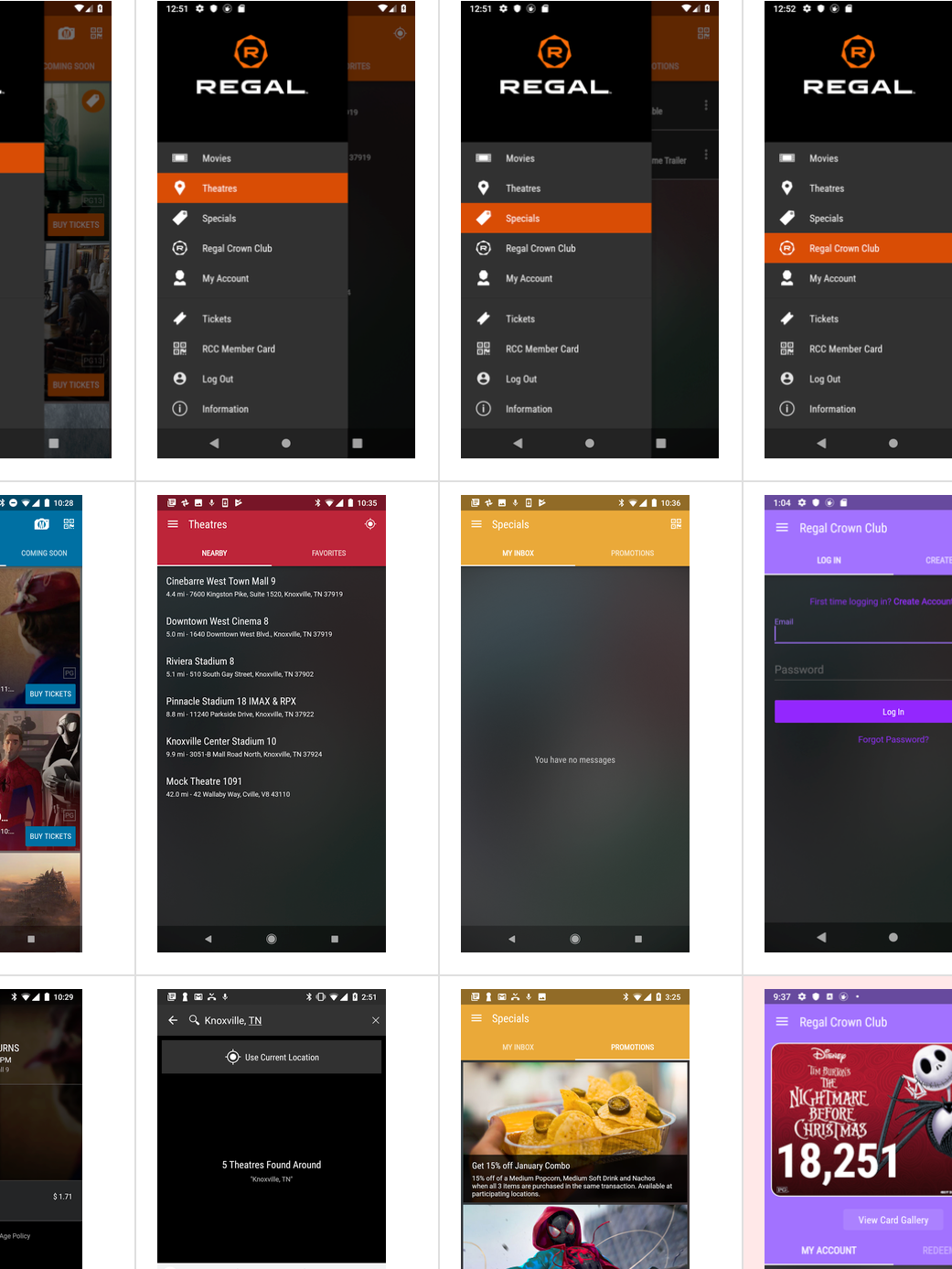
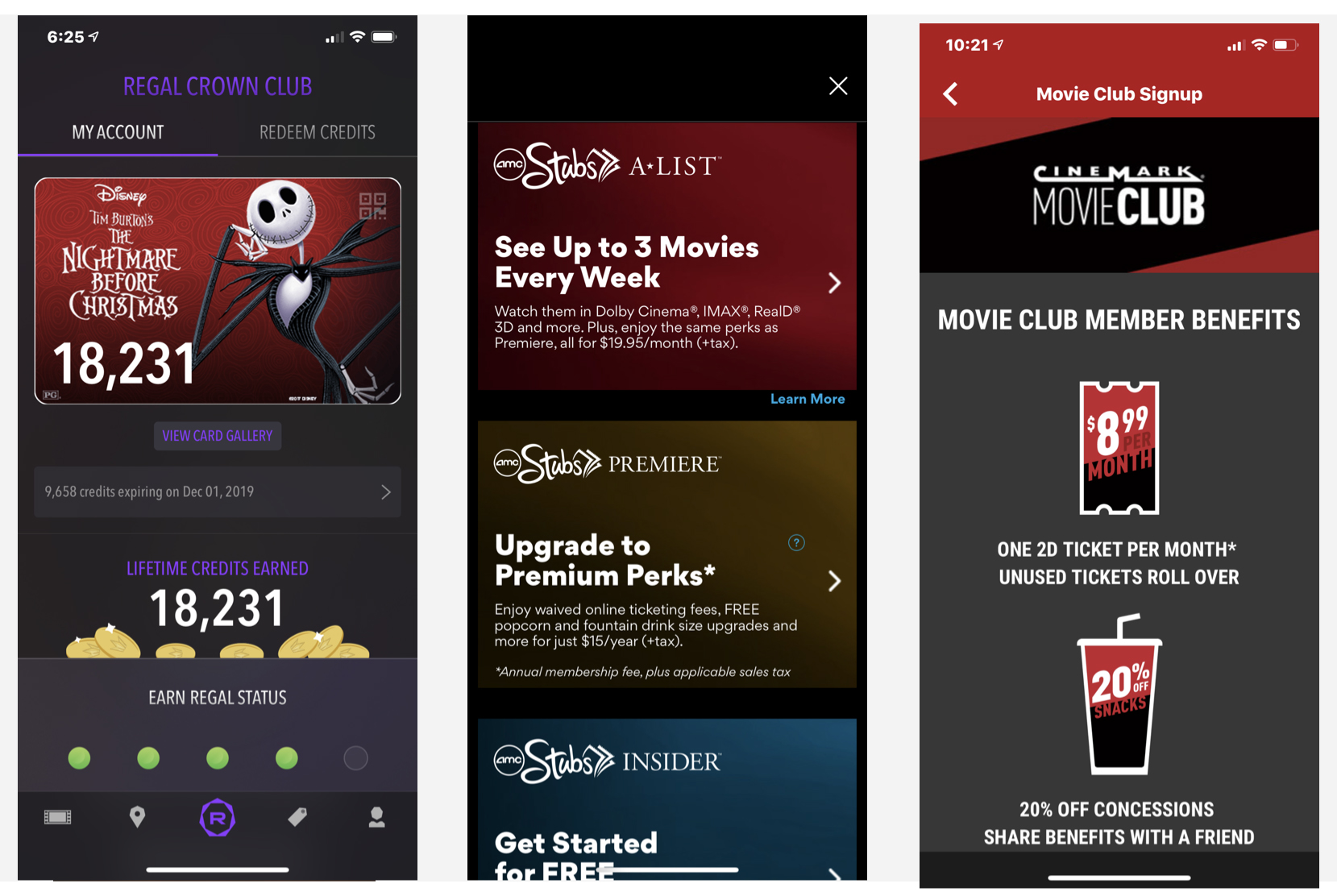
    Loyalty and subscription programs: Regal, AMC, Cinemark
    Loyalty and subscription programs: Regal, AMC, Cinemark

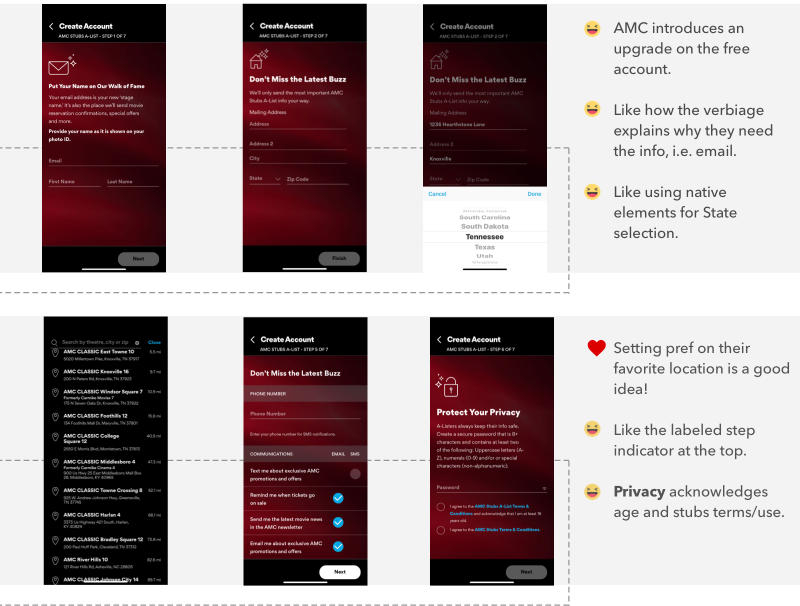
    Mapping Competitors Emotions

    AMC’s workflow is smooth but seems like a lot of steps. It’s smooth because the steps drop-down; therefore, we feel like there are fewer steps. But the information visually feels heavy in weight.

    After having reviewed the workflow and capturing the current state, comments noted to the side dictate emotions towards the experience.

    Subscription screen workflow: AMC
    Subscription screen workflow: AMC

    Conditional Workflows

    Before requirements are flushed out, a rough workflow and conditional behaviors are mapped out based on assumption.

    The workflow becomes a guide we use to understand better the users’ journey— each card below lists out content on each screen and actions the user can take.

    Task user flow: Sign Up or Sign In as a Regal Crown Club Member
    Task user flow: Sign Up or Sign In as a Regal Crown Club Member

    Designing for scenarios

    Capturing different scenarios help with edge cases, system and app errors, and additional requirements missed.

    In the scenario below, the user has already signed up for unlimited and logged in. They complete the following tasks:

    • Login
    • Book a ticket
    • Redeem a ticket

    Once scenarios are defined, design can work on screens. It helps designers to provide a context of use, patterns, and conditional behaviors.

    Scenario 2: User is Unlimited member, but not logged in.

    Scenario 2:
User task flow: User is Unlimited member, but not logged in
    Scenario 2:
    User task flow: User is Unlimited member, but not logged in
    User task flow: entire sequence
    User task flow: entire sequence

    Usability Test Sessions

    We scheduled two sets of testing. Initially we proposed three, but leadership shortened the timeline due to MVP deadlines.

    Each day consisted of two participants, one in the morning and one after lunch—gift cards given to candidates showed appreciation for participating.

    “continuous iterations with in-between testing sessions helped quickly evolve the design”

    Each candidate is a Regal Crown Club Member (RCC). Data pulled from a Loyalty member list. The ages spanned from 18-60 years old.

    • Motivation – saving money because they loved to watch movies
    • Needs – transparency in how much money they are spending
    • Desires – to share the movie experience with their friends and family
    • Frustrations – input of information

    Recruiting and Testing

    Calling and recruiting RCC members; criteria varied by way users experience booking from:

    • Box office
    • Website
    • App

    One thing we heard over and over again during testing was transparency. That was the most important takeaway.

    Users want to know cost upfront first before they go to the trouble of signing up for something.

    Letting the users know the pricing and terms early, helped motivate them to complete the signup process.

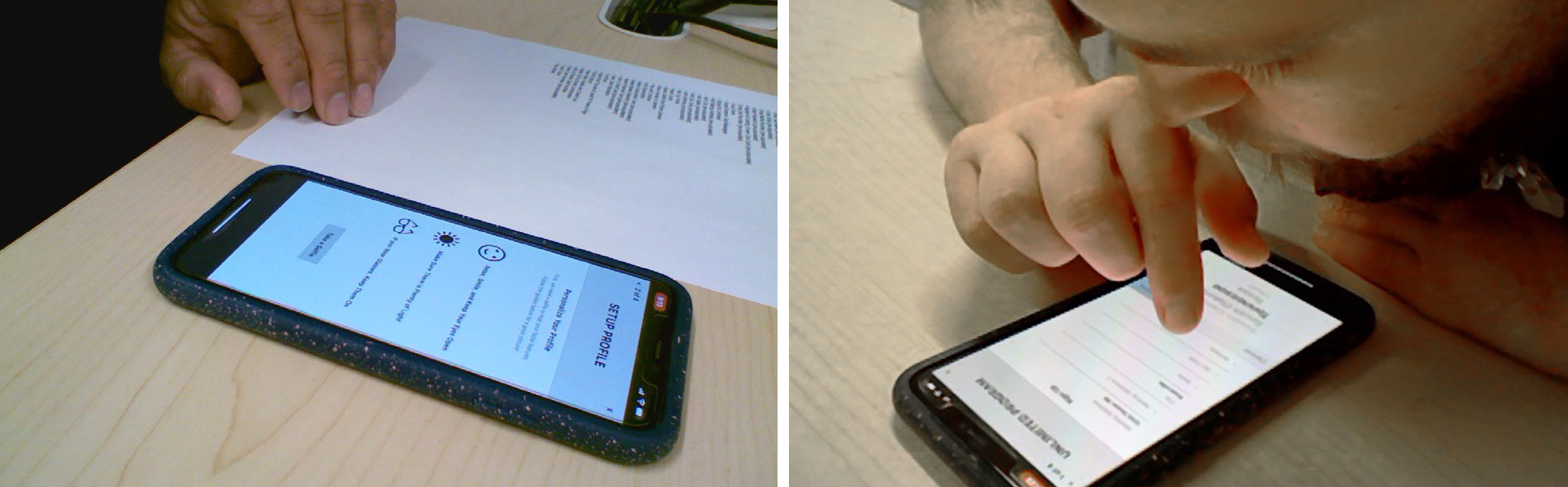
    In. house usability testing: IPEVO camera
    In. house usability testing: IPEVO camera

    Mental Models

    Setting expectations and guiding users for a successful registration is our goal.

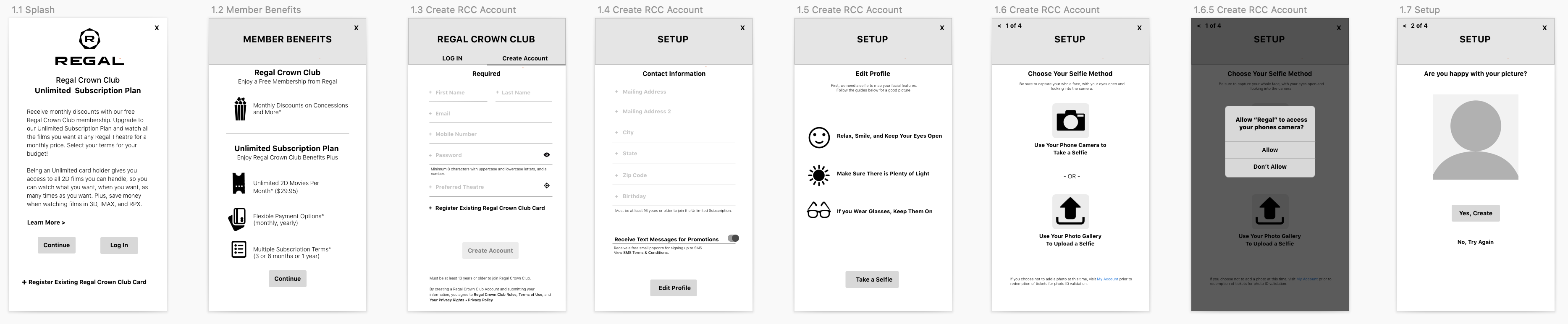
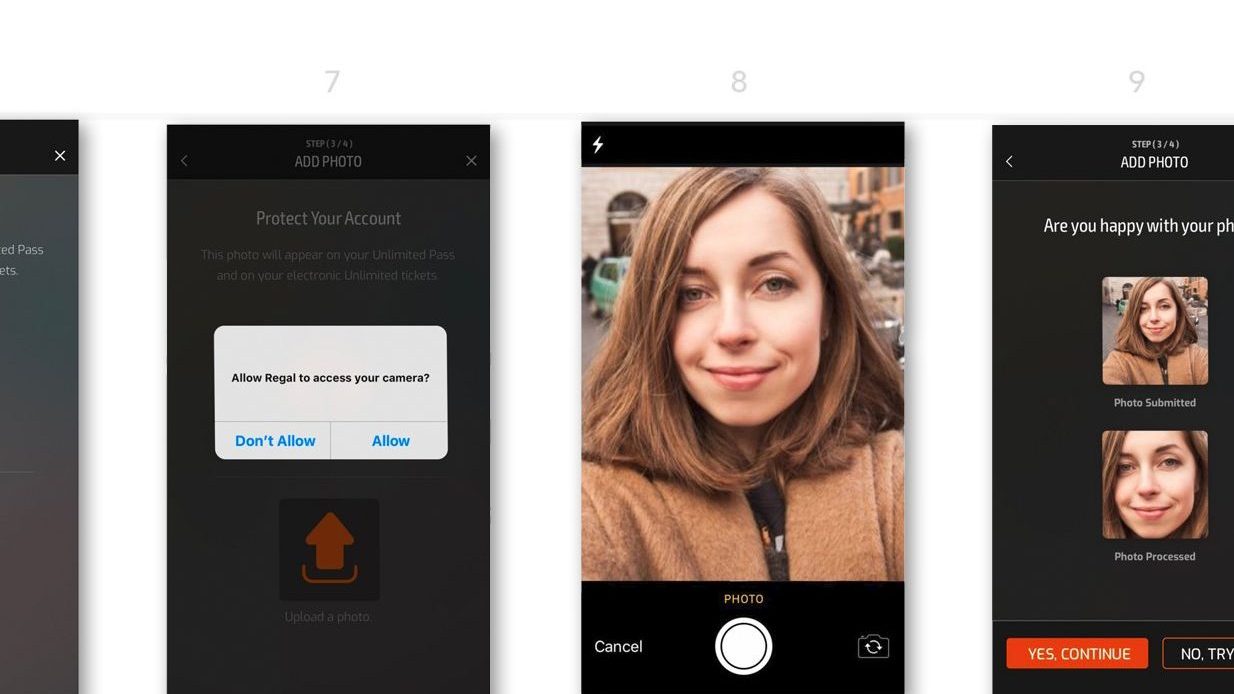
    Below are a few onboarding screens, which link off to further information early on in the workflow.

    Walking the user through the process using iterative steps is critical. Because it is a lot of information to enter, the incremental steps allow for chunking of information so the user will not feel overwhelmed.

    “keep the user engaged and motivated to by having short sequential tasks”

    Lo-fi wireframes
    Wireframe flow: Onboarding
    1st iteration of design
    1st iteration of design

    Field Observation

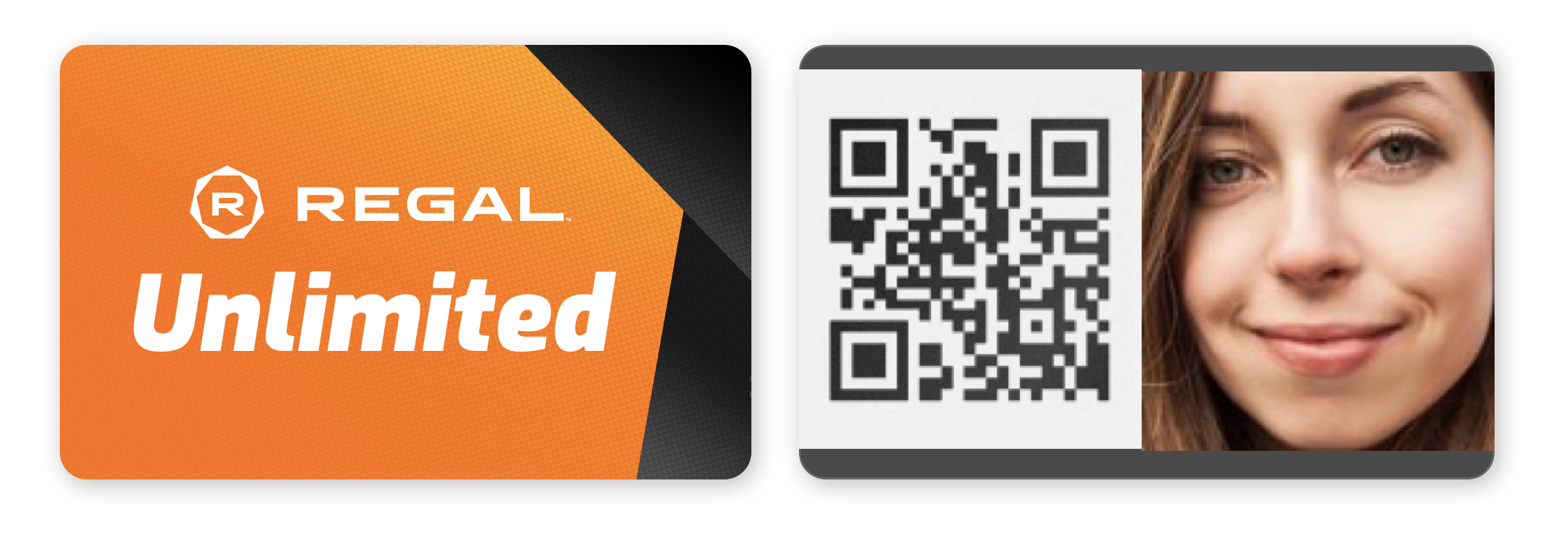
    Following the launch, we went to the theatre to watch moviegoers use the app. Unlimited subscribers can enter the show using the QR code on the back of their digital card.

    Observing users was terrific; the use of the unlimited card for discounts on concessions appeared seamless.

    By scanning the card, the purchase is faster, promotes special perks, makes the user feel good, and adds personalization to the experience.

    Unlimited digital card for in-app ticket scanning
    Unlimited digital card for in-app ticket scanning
    Field research: Observation of members using digital card for discounts at concessions

    Field research: Observation of members using digital card for discounts at concessions

    Takeaways

    In the beginning, requirements were long for MVP, but it could have broken down to allow for a faster design process.

    The biggest takeaways are the UX findings during the usability sessions. Transparency was the number one thing we heard. Transparency builds trust, which encourages users to continue the signup process.